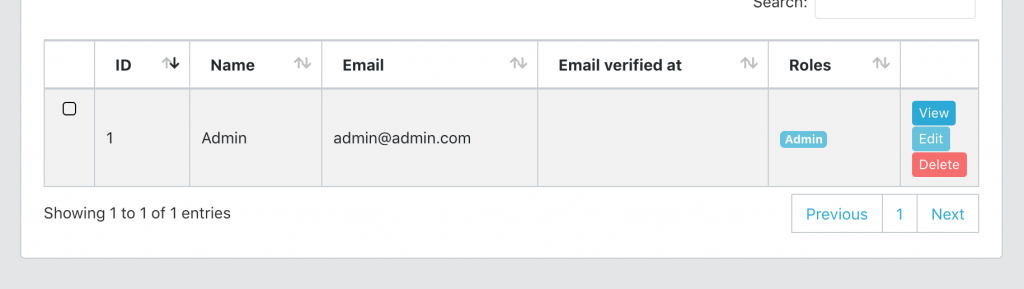
Usually in each datatable there is a column with buttons – Edit, View, Delete. But it is often visually more interesting to “hide” it and just see some icon (like three vertical dots) and display the action simply by clicking on this icon. How to implement it in Laravel, and specifically in QuickAdminPanel?
What am I talking about here?
Here’s a visual explanation.
BEFORE
AFTER
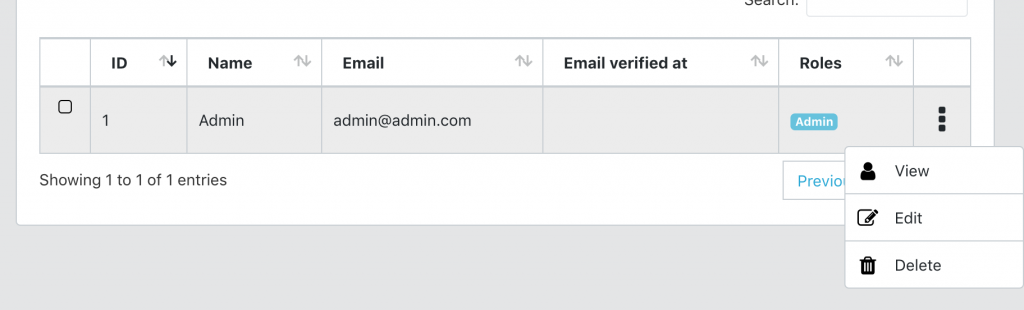
Now, how do I replace those buttons with that icon+dropdown?
In general, these are JavaScript changes, not much about Laravel. But I will base this article on a Laravel project generated by our QuickAdminPanel.
In our system, you may have two types of Data Tables – “regular” and AJAX based. So we will discuss both cases.
Case 1. With a “Simple” non-AJAX Data Table.
Here’s a typical code snippet resources/views/admin/users/index.blade.php:
<td>
    @can('user_show')
        <a class="btn btn-xs btn-primary" href=" route("admin.users.show', $user->id) }}">
            {{ trans('global.view') }}
    @endcan

    @can('user_edit')
        <a class="btn btn-xs btn-info" href=" route("admin.users.edit', $user->id) }}">
            {{ trans('global.edit') }}
        </a>
    @endcan

    @can('user_delete')
        <form action=" route("admin.users.destroy', $user->id) }}" method="POST" onsubmit="return confirm('{{ trans('global.areYouSure') }}');" style="display: inline-block;">
            <input type="hidden" name="_method" value="DELETE">
            <input type="hidden" name="_token" value="{{ csrf_token() }}">
            <input type="submit" class="btn btn-xs btn-danger" value="{{ trans('global.delete') }}">
        </form>
    @endcan
</td>
So, a simple list of links/buttons, limited by Blade’s @can command.
To change it to a dotted dropdown, we change it to this:
<td>
    <div class="dropdown text-center">
        <a class="dropdown-button" id="dropdown-menu-{{ $user->id }}" data-toggle="dropdown" data-boundary="viewport" aria-haspopup="true" aria-expanded="false">
            <i class="fa fa-ellipsis-v"></i>
        </a>
        <div class="dropdown-menu" aria-labelledby="dropdown-menu-{{ $user->id }}">
            @can('user_show')
                <a class="dropdown-item" href=" route("admin.users.show', $user->id) }}">
                    <i class="fa fa-user fa-lg"></i>
                    {{ trans('global.view') }}
                </a>
            @endcan

            @can('user_edit')
                <a class="dropdown-item" href=" route("admin.users.edit', $user->id) }}">
                    <i class="fa fa-edit"></i>
                    {{ trans('global.edit') }}
                </a>
            @endcan

            @can('user_delete')
                <form id="delete-{{ $user->id }}" action=" route("admin.users.destroy', $user->id) }}" method="POST">
                    @method('DELETE')
                    @csrf
                </form>
                <a class="dropdown-item" href="#" onclick="if(confirm('{{ trans('global.areYouSure') }}')) document.getElementById('delete-{{ $user->id }}').submit()">
                    <i class="fa fa-trash"></i>
                    {{ trans('global.delete') }}
                </a>
            @endcan
        </div>
    </div>

</td>
See what we’ve done here? Just added div class=”dropdown and in it all the links are there div class=”dropdown menu” with div class=”dropdown item”.
The final change we need to make here is some of the same CSS index.blade.php file at the bottom.
@section('styles')
<style>
.dataTables_scrollBody, .dataTables_wrapper {
    position: static !important;
}
.dropdown-button {
    cursor: pointer;
    font-size: 2em;
    display:block
}
.dropdown-menu i {
    font-size: 1.33333333em;
    line-height: 0.75em;
    vertical-align: -15%;
    color: #000;
}
</style>
@endsection
That assumes you have @result(‘style’) code in your main layout somewhere.
Case 2. AJAX Server Side Data Table
In the case of AJAX, we load those action buttons from a specific Blade file – resources/views/partials/datatablesActions.blade.php.
It actually looks very similar to index.blade.php above, it’s just more flexible because of use all data tables in the project.
By default, it looks like this:
@can($viewGate)
    <a class="btn btn-xs btn-primary" href=" route("admin.' . $crudRoutePart . '.show', $row->id) }}">
        {{ trans('global.view') }}
@endcan
@can($editGate)
    <a class="btn btn-xs btn-info" href=" route("admin.' . $crudRoutePart . '.edit', $row->id) }}">
        {{ trans('global.edit') }}
    </a>
@endcan
@can($deleteGate)
    <form action=" route("admin.' . $crudRoutePart . '.destroy', $row->id) }}" method="POST" onsubmit="return confirm('{{ trans('global.areYouSure') }}');" style="display: inline-block;">
        <input type="hidden" name="_method" value="DELETE">
        <input type="hidden" name="_token" value="{{ csrf_token() }}">
        <input type="submit" class="btn btn-xs btn-danger" value="{{ trans('global.delete') }}">
    </form>
@endcan
Similar, right? Three buttons. Nearly identical to the tweak above, let’s change it to a three-dot icon dropdown.
<div class="dropdown text-center">
    <a class="dropdown-button" id="dropdown-menu-{{ $row->id }}" data-toggle="dropdown" data-boundary="viewport" aria-haspopup="true" aria-expanded="false">
        <i class="fa fa-ellipsis-v"></i>
    </a>
    <div class="dropdown-menu" aria-labelledby="dropdown-menu-{{ $row->id }}">
        @can($viewGate)
            <a class="dropdown-item" href=" route("admin.' . $crudRoutePart . '.show', $row->id) }}">
                <i class="fa fa-eye fa-lg"></i>
                {{ trans('global.view') }}
            </a>
        @endcan

        @can($editGate)
            <a class="dropdown-item" href=" route("admin.' . $crudRoutePart . '.edit', $row->id) }}">
                <i class="fa fa-edit"></i>
                {{ trans('global.edit') }}
            </a>
        @endcan

        @can($deleteGate)
            <form id="delete-{{ $row->id }}" action=" route("admin.' . $crudRoutePart . '.destroy', $row->id) }}" method="POST">
                @method('DELETE')
                @csrf
            </form>
            <a class="dropdown-item" href="#" onclick="if(confirm('{{ trans('global.areYouSure') }}')) document.getElementById('delete-{{ $row->id }}').submit()">
                <i class="fa fa-trash"></i>
                {{ trans('global.delete') }}
            </a>
        @endcan
    </div>
</div>
Same thing – DIV with dropdown related CSS class.
Teknologi Terkini
Agen Togel Terpercaya
Bandar Togel
Sabung Ayam Online
Berita Terkini
Artikel Terbaru
Berita Terbaru
Penerbangan
Berita Politik
Berita Politik
Software
Software Download
Download Aplikasi
Berita Terkini
News
Jasa PBN
Jasa Artikel
News
Breaking News
Berita